Showing posts with label Android. Show all posts

WhatsApp's Latest call feature now avaliable to general public.

Whatsapp's new cool feature-Whatsapp calls..

Here how you can get it....

WhatsApp, the popular instant messaging client, is working on a voice-calling feature which it plans to release to the public soon. WhatsApp has been rolling out the functionality to select users as part of a beta test program, something the company had confirmed last month. BetaNews is now able to report and confirm that WhatsApp is once again rolling out the voice calling feature to many users, and the invite can be disseminated if a user with the feature working on their Android device makes a phone call from within the app to other Android users. We tried to make it work on an iPhone, but couldn't; and we're yet to try it on a Windows Phone handset.

Last year, WhatsApp announced that it was working on a voice-calling feature and would release it to users by the second half of 2014. While that obviously never happened, the company last month began to flip the switches for many users as part of a beta testing program. Last month, it had confirmed that it was beta testing the feature and would release to all as soon as it is satisfied with the initial results.

We have talked in length about why this feature matters to users. According to the latest estimations, more texts are being sent through WhatsApp than via traditional SMS. Statistically too, in emerging markets such as India, a voice calling feature over the web could significantly reduce users’ phone bills.
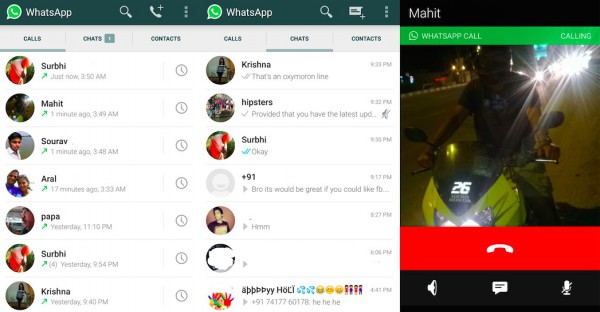
WhatsApp Call
For a quick analogy, I compared a regular phone call’s tariff with a voice call over the web last month. “Skype, for example, uses 6 to 20 kbps or around 150KB per minute for a voice call. The amount a user would have to pay for this much data is a lot less than a voice call tariff. In India, for instance, that much data usage with standard internet data plans of say $2-4 per GB will provide users with over 6,820 minutes, something which would otherwise cost a user Rs 6,820 (more than $100) over a typical voice call.”, I had inferred.

Users are required to have either v2.11.528, or v2.11.531, or v2.22.555 (which you can download from our reliable friends at APKMirror) of WhatsApp installed on their Android smartphone or tablet. After which, they are eligible to snag the feature provided someone with the feature working on their handset makes a phone call to them. We’ve personally invited a number of users and can vouch for this invitation system’s validity. That said, we are not sure how long WhatsApp will keep the invitation system open.

Root Any Android Device With MotoChopper:


Root Any Android Device With MotoChopper Rooting Tool:


Before Rooting Read This:What Is Root...?
MotoChopper Rooting tool for android devices.Actually this tool was developed to root only Motorola devices but after sometime when tested on other devices it was found that MotoChopper can root non-Motorola devices as well. So let us turn towards the tutorial to root android deviced by MotoChopper

Slider MultiWindow For Android Mobile:


Slider MultiWindow For Android Mobile:Installations:Just Install This Apps1) MultiWindow Sidebar AppDownload HereFor Resize & Movable AppS: [[ Root ]]2) Then Install Xposed Installer OR Xposed Installer Website3) Then Install XFloating Windows OR XHaloFloatingWindow website>> NOTE: FOR INSTALLATION Xposed Installer & XFloating Windows Click Here << Tested

Multi-Window For Any Android Mobile:


Multi-Window For Any Android Mobile(Tested On Jelly Bean 4.2.1)Installation:Note: You Needed A Rooted Phone1) First Install Xposed Installer OR Xposed Installer Website2) Then Install XFloating Windows OR XHaloFloatingWindow website3) Then Install PA Halo apk OR Halo (Play Store)( If This apps Shows Installation Error Then This Method Not Work On Your Mobile )Process:

Android Reverse Tethering for Windows Users:


Android Reverse Tethering for windows users...

This work only for Rooted Android users and for Windows!!!

Installation :
Unpack the zip file. This zip files contains the windows part, ADB and the android APK.

Before starting the tool :
> You must install drivers for your device. Generic driver provided by google is on the usb_driver.zip
> Ensure you have debugging enabled on your phone

BlackBerry Messenger (BBM) For PC


BlackBerry Messenger (BBM) For PC:BlackBerry Messenger (BBM) is a proprietary Internet-based instant messenger and videotelephony application. It was developed by the manufacturer of the BlackBerry,
BlackBerry Limited (formerly known as Research In Motion Limited (RIM)).
It was released to Android a few days ago. Follow the tutorial to Install BBM on your PC.


Requirements:
1. Android SDK

How to Unlock an Andriod Pattern:


How to Unlock an Andriod Pattern:


Many android phone user use the inbuilt unlock pattern for give security to there phones this is very easy to use but some time to take many wrong attempts it locked permanently after that you need to enter the user id you enter in the google play store to unlock phone but there is some problems to unlock again if u stop data usage in your so it can�t be

How to Remove Android Pattern:


How to Remove Pattern Unlock with ADB and Debugging ON
[No-ROOT]


The Device Needs to have usb Debugging Enabled in case USB Debugging
isn't enabled and you have cwm you can Run the Same Instructions from
cwm, root is Not Required
(Though it will be so better if the Device was
rooted)

this was tested on: Gingerbread, Ice-cream Sandwich and Jelly Bean.

Both method are through adb.

WhatsApp For PC


Download WhatsApp for PC:


You can download many applications like WhatsApp Messenger etc on the Google Play Store with the help of BlueStacks.


## How to Running WhatsApp on PC :
First of all, you need to download Bluestacks in PC or Mac.

Download Bluestacks,

OR Bluestacks Download Here

and Install it on your pc. After installing Open it.

# Now Open the Application You can

What Is Android Root:


# Root Warning / Disclaimer:
>> Quick note / disclaimer: as always, you are ultimately responsible for any root-related activities on your phone.
You should understand not only the benefits of rooting, but also any possible consequences (voided warranty, boot-loops, bricking, etc.) that might occur as a result of your root-related actions.
Reading, researching, understanding, and